Thursday, 15 February 2018

Oracle APEX Interactive report date order by

Interactive report date order by


DECODE over CASE statement


Oracle APEX - IR sort order not working?


We all know and love Interactive reports in APEX. This is a quick post showing a typical user case where sort order was rude to a customer.  


Why?

Looking at the source code for this region nothing jumps out:
SELECT           
     event_id,        
     DECODE (evf.start_date_did,
             0, null,
             evdat.calendar_date)
     AS event_start_date        
 FROM event_fact evf
 JOIN date_dim evdat
    ON evdat.date_did = evf.start_date_did   

For some reason APEX was seeing this date as a varchar. But again why would this not work if column returned is defined as date in a table.

Digging deeper into a problem we looked at definition of DECODE function and noticed this: 
"..If the first result is NULL, then the return value is converted to VARCHAR2."
Great this as usual confirms that we have an issue in the query not in APEX itself. 

Workarounds: 
1. Rewrite your query to use a date over a NULL in your decode statement
SELECT           
     event_id,        
     DECODE (evf.start_date_did,
             0, to_date('01-JAN-1900', 'dd-mon-yyyy'),
             evdat.calendar_date)
     AS event_start_date        
 FROM event_fact evf
 JOIN date_dim evdat
    ON evdat.date_did = evf.start_date_did
Or even better use CASE statement: 
SELECT           
     event_id,        
     CASE
      WHEN evf.start_date_did != 0
       THEN evdat.calendar_date END        
     AS event_start_date        
 FROM event_fact evf
 JOIN date_dim evdat
    ON evdat.date_did = evf.start_date_did  

Summary, there is a difference between DECODE and CASE statement working with NULLS which can cause similar issues so be warned and keep an eye out. 


Happy APEXing,
Lino

Friday, 9 February 2018

Oracle APEX - Show hide regions and items on large scale

Show hide regions and items on large scale


Using DA or JavaScript?


Oracle APEX - handling hide and show methods with a catch


Simple problem - Page with large number of items (527+ form fields for example :D) and depending on certain field you want to show some where the rest stay hidden.  

Of course you could do this declarative way by using Dynamic actions where for you first hide all then for certain condition you show items. Only concern the more conditions you put in things become cumbersome.

But issues that I came across came from the fact that my approach was for that reason different. Why? Because I was dealing with 527 items on the form where there were 37 different groups of items dictated by 1 form field so was looking into a way how to process most of show/hide behavior with less code. 

The example of code above is a demo one not the original form but concept and the problem stays the same. Lets say APEX_APP_ID contains 37 values where the rest columns 400+ of them fit in one of groups (sometimes in more than one so could not just group them easily in regions). Hopefully this describes the problem well. I used regions to group most of items together but still challenge was there. 

Task number 1. Hide all

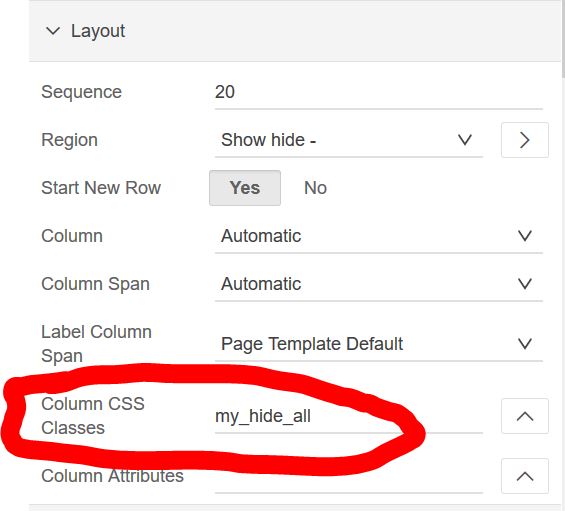
Great way of doing this is by using CSS Classes attribute under your page item/region properties.

 Then all it comes down to is running once all elements have their class set:
$( ".my_hide_all").hide();
Awesome - all items are now hidden. So simply have to show them when I want. Easy right? Well I thought so too before learning this lesson. 

Task 2. Show items
I thought this should do the trick:
apex.item( "P1_ITEM" ).show();

As you can image it did not work. The reason is because my class was set on a wrong level;  so DOME row CSS still had display:none;  set.

In my above example solution was to use: 
 $('#P1_ITEM').closest(".my_hide_all").show();

This then worked fine. I admit did not see this coming. 

Once I placed a CSS class on 
appearance section CSS Classes things were back as expected and I was able to show it using
apex.item( "P1_ITEM" ).show();
On the other side if I used DA to first hide then to show an item (with True Action-> Action Show) worked like a char straight away. Well I guess lesson learned for today. :D

Happy APEXing,
Lino

Tuesday, 23 January 2018

Oracle APEX and 12.2 upgrade

Oracle APEX 5.1.x and Oracle 12.2 upgrade


Doc ID 2339601.1 apex_web_service issue


 Oracle 12.2 multiple domain certificates issue


This is something to be aware of in case you are updating to Oracle 12.2 as it may require some additional changes to your PL/SQL code. 

Our scenario, we were running APEX 5.1.2 on Oracle 12.1 with APEXOfficePrint and wanted to stage and test our 12.2 upgrade process. 

All other APEX things seemed to be working fine after the upgrade until we discovered that our rest service calls to AOP started to fail. 

Digging deeper into this problem we discovered there were changes in 12.2 that "broke" one of key APEX REST packages - APEX_WEB_SERVICE. 


To be technically clear here 12.2 changed UTL_HTTP package definition that at the end is used by apex_web_service package. APEX uses apex_web_service as wrapper procedure for utl_http. More info here.

That in the end can caused AOP to stop working on our end.  

It is not something caused by AOP and can happen to any web services call you make in your application under certain condition - if server your database is talking to has multi-domain certificate configuration so please be aware of it.

This is a security improvement on 12.2 which is not questioned but definitely something everyone planning to do the upgrade need to cater for. 

To elaborate further let's see some examples.

1. UTL_HTTP in 12.1 and APEX 5.1.2 works perfectly fine,
select utl_http.request( 'https://www.apexofficeprint.com/api/', wallet_path=>'file:/mywallet') from dual;
where with 12.2 after the upgrade there is now an issue and you need to run it using additional parameter https_host to make it work.
select utl_http.request( 'https://www.apexofficeprint.com/api/',wallet_path=>'file:/mywallet', https_host=>'www.apexrnd.be/aop') from dual;
or mapping it directly to your top domain
select utl_http.request( 'https://www.apexrnd.be/aop', wallet_path=>'file:/mywallet') from dual;
2. Similar for apex_web_service on 12.1 and APEX 5.1.2 this worked fine 
select apex_web_service.make_rest_request(p_url => 'https://www.apexofficeprint.com/api/', p_http_method => 'GET') from dual;
In 12.2 running APEX 5.1.2 same process would fail and you would have to do.
select apex_web_service.make_rest_request(p_url => 'https://www.apexrnd.be/aop/', p_http_method => 'GET') from dual; 
So if you are planning to upgrade to 12.2 also make sure that you plan to upgrade your APEX to 5.1.4 where this problem has been fixed as https_host parameter is exposed as p_https_host so running


select apex_web_service.make_rest_request(p_url => 'https://www.apexofficeprint.com', p_http_method => 'GET') from dual;
would be fine. 

Going back to AOP in this APEX 5.1.2 combo with Oracle 12.2 this would mean that your plugin config for AOP would need updating to

Further reading - Skillbuilder - John Watson's blog.

Happy APEXing,
Lino