Thursday, 21 February 2019

APEX 18.2 and Interactive grid detail view sorting

APEX 18.2 and IG Detail view


IG Detail view does not have a sort by feature


Workaround?


This post is about how you can cheat your interactive grid detail view and still impose ordering of your elements. 

First of all I will assume you know what detail view of IG is and how to get it working. 

If not please refer to my previous post or download IG cookbook app by John Snyders as there is a great example of detailed view implementation in there. To be precise I am talking about page 20.

In my example I have done the same created IG, defined it to show Detail view and slightly simplified how my 'cards' are structured.


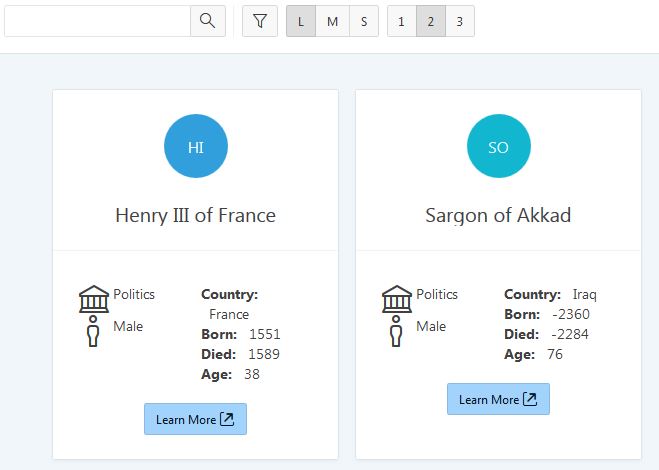
Okay if I now run my page this is what I get

As you can see my elements are in random order. Unfortunately there is no out of the box way to get this sorted. 

How do we get this sorted?

Answer is of course using JavaScript. 

So my initial idea was to add row_number() over( order by empno desc ) row_nbr,

to my query so I can utilized this later using JavaScript. But I encountered a problem described more in my previous post where aggregate column causes IG save process to break. 

You may be lucky enough that your IG does not have to save the data so you may even use this approach. As alternative you can simply rely on your ID column or even on a date column. This should all give you a solid grounds for ordering your elements. 

In my case I had to use date based approach. So I added to_char(created_date, 'YYYYMMDDD') as sort_by 
 
to my query. Next step is to update an HTML used in detail view to include this column.


You probably already see where the story is going. To make sure all is rendered well inspect your page
Which shows that we successfully added new data-* tag to our HTML.

If you add this to your Function and Global JS page functions
$("#p40-monthly-update").on("tablemodelviewpagechange", function (event, data) {
    var numericallyOrderedDivs = $("div.my-IG-details").sort(function (a, b) {
        return $(b).attr("data-sort-id") - $(a).attr("data-sort-id");
        });
   
        $("#p40-monthly-update .my-sort-container").html(numericallyOrderedDivs);
}); 


This will do the magic of sorting for you. #p40-monthly-update is my IG region ID.

What it does is it gets an array of elements based on a div tags we created and sorts the array before passing it back to DOM. Simple but still helpful. ;)

I am sure there are other ways how to achieve the same but most will use similar approaches until we do not get this configurable out of the box in IG. Maybe 19.1 version will address some of these issues so keep an eye out.


Happy APEXing,
Lino

Monday, 18 February 2019

IG Automatic row processing issue using virtual aggregating column

APEX 18.2 and IG Automatic row processing issue


Using virtual aggregating column in IG source query


Interactive grid row processing issue


If you add a virtual aggregate column to your IG your Automatic Row Processing process stops working completely!!

First you get

After you set Prevent Lost updates on your page process to No
the error changes


but it still does not work.

It simple to reproduce
  • create a page
  • create an IG region with select * from emp;
  • make it editable
  • save and run (everything works fine right!!?)
  • Add row_number() over(order by empno desc) row_nbr,
  • set the column to be hidden and Source to be Query only

Your IG Save process for some reason is now broken. Weird thing is it even reorders your IG.

Demo example on apex.oracle.com -> https://apex.oracle.com/pls/apex/f?p=84111:15
 

Even with a manual processing it still does not seem to work.

I raised a ticked for this on OTN. 

Now you may wonder why on earth would I want to do this. Answer to this in my follow up post. ;)

Happy APEXing,
Lino 


P.S. 22 Feb 2019 Update as per OTN replies

Marko's suggestion on how to include aggregate function is: 
- Change column source to the SQL Expression and as a source use row_number() over (order by EMPNO desc)

 Also manual PL/SQL process works fine with aggregate function I had two processes on my interactive grid out of which one had Server side condition = Never but it was still executed by page accept process casing the error. Now I have separated the two to better show case this issue. :)

Thanks all for your help on this one.

Sunday, 17 February 2019

APEX 18.2 and IG Detail view after refresh DA

APEX 18.2 and IG Detail view after refresh


How to catch after refresh of your IG detail view?


Interactive grid Detail view after refresh DA


Another post from the factory last week on IG Detail view. 

Perfect we got IG Detail view up and running now using images. What we want to do next is trigger a DA when IG Detail view region refreshes.


Let's say we wanted to run an after refresh process. 

How do we do this? 
If you look at documentation on 18.2 Interactive Grid widgets there is loads to figure out. 

From blogs and online documentation initial attempt was to try utilizing known event listeners like  

.on( "interactivegridmodechange", function( event, data ) { console.log(1, event, data); } );
.on( "interactivegridreportchange", function( event, data ) { console.log(2, event, data); } );
.on( "interactivegridreportchange", function( event, data ) { console.log(3, event, data); } );
.on( "interactivegridsave", function( event, data ) { console.log(4, event, data); } );
.on( "interactivegridselectionchange", function( event, data ) { console.log(5, event, data); } );
.on( "interactivegridviewchange", function( event, data ) { console.log(6, event, data); } );
.on( "interactivegridviewmodelcreate", function( event, data ) { console.log(7, event, data); } );
.on( "gridmodechange", function( event, data ) { console.log(8, event, data); } );
.on( "gridreportchange", function( event, data ) { console.log(9, event, data); } );
.on( "gridreportchange", function( event, data ) { console.log(10, event, data); } );
.on( "gridsave", function( event, data ) { console.log(11, event, data); } );
.on( "gridselectionchange", function( event, data ) { console.log(12, event, data); } );
.on( "gridviewchange", function( event, data ) { console.log(13, event, data); } );
.on( "gridviewmodelcreate", function( event, data ) { console.log(14, event, data); } );

But after running this statement in browser console

apex.region("people_ig").refresh();
    
Indicates that none actually trigger after data has been refresh on Detailed view. So plan #1 is no good. 

Alternative, again thanks to a good man Shaun Mauer we came up with plan B. 

$(function() {
    var igGrid$ = $("#people");
    igGrid$.on("interactivegridviewmodelcreate", function(event, ui) {
     var model = ui.model;
     if (ui.viewId === "detail") {
         sid = model.subscribe( {
              onChange: function(type, change) {
                 console.log(15, ui.viewId, type, change, event,ui);
              }
         });
     }
   });
});

 
 which was shown incorrect as it was not triggering after region refreshed.

 After a brief discussion John Snyders came with the correct widget.  

apex.region("people").widget()
       .on("tablemodelviewpagechange", function(event, data) { 
            console.log("Page change ", data); 
});

Big thanks to all who participated getting to here and hope we will save someone time having it in a blog too.

Happy APEXing,
Lino

Tuesday, 12 February 2019

APEX 18.2 and IG Detail view issue

APEX 18.2 and IG Detail view


How to display url based images in your IG cards?


Interactive grid Detail view issue


While it is still fresh I want to write down very interesting feature we encountered working with Interactive grid Detail view last week.
 

Brief was simple we wanted to have a reporting region base on SQL query that would show us cards and ideally leverage lazy loading as infinite scrolling. Straight away IG rang a bell.
 

Cutting the story short, we started playing with IG Cookbook application that is great resource to learn about IG in general by John Snyders. 

Obvious candidate is page 20 titled IG Cards.

It is doing all what we wanted it has a card template embedded it is based on SQL query and has infinite scrolling support. Perfect!

Requirement #2 is let’s display image inside of the card but not one from Font APEX but any image accessible over URL.

Idea to get to this is to  
1. modify your query on page 20 add a column that would hold your URL. 
Something like '#WORKSPACE_IMAGES#any.gif' as img_src.

Then you reference this in your Attributes -> For Each row under a Detail view using a substitution string <img src=&IMG_SRC. />. 

Save and run the page. Great, image is there, all works as expected. Everyone is happy!???

Well not quite. Open your browser console network tab and refresh the page. You will see 404 resource not found error like below. 
After few days of trying to work out why this is happening we posted a question on #orclapex slack channel and OTN forum. 

As this is not something you would expect to get considering that our page is displaying correctly, IG is working and there are no other JS messages.

More in depth story you can find here.


Bottom line here is, there is a flaw in how IG creates this template and gets your data in so browsers can detect an empty/invalid URL in this process. 

Luckily, APEX community is a great community and Shaun Mauer jump to the rescue with his idea.


Workaround
  1. Change your Query column source to be 
  2. Change IMG_SRC to be of HTML Expression type with &IMG_SRC. as a source
  3. Change your Card template so that it only uses &IMG_SRC. now in place where we had <img src=”&IMG_SRC.” />    
This should make 404 go away and now is time to celebrate. 

To add to this is that, maybe in next release of APEX we may see this fixed in IG detailed view.


Again big thanks goes to John as well for joining the conversations.

Happy APEXing,
Lino