Friday, 7 August 2020

APEX_ITEM and checkbox processing the easy way


APEX_ITEM and checkbox processing

Oracle apex_application.GFnn made easy


Few days ago I have been asked for an advise on how to process form/reports based on APEX_ITEM and since this can be very confusing to people new to APEX I decided to share a quick and easy way of processing your records. 
 
We all saw a form looking like this before
 
and probably we have learned how to process it using something similar to
FOR i IN 1 .. apex_application.g_f01.COUNT LOOP
insert into MY_TABLE (NAME, GENDER)
   values ( apex_application.g_f01(i), apex_application.g_f03(i) );
END LOOP;
That was all smooth sailing so far but what if we wanted to do something that involved multiple checkboxes. This is where things would start to get out of hands. 

Problem we all run into are checkboxes unlike with APEX_ITEM.TEXT or APEX_ITEM. SELECT_LIST is that only if they are checked we can loop through them. So very often our loops end up in a dead end and we get ORA-ERRORs. 
 
Looking at the image above I want to select columns that I want to see plus say if I will do aggregate or average calculations on them which is completely optional.

 
Notice that some of columns that are of data_type varchar or date are disabled how would we go about processing something like this. 
 
Before I go into my example there are really good read outs by Jeffrey and Roel among others which will help to understand it in more details too.
 
Lets look under the hood. First we would create a Classic report region with SQL as source.
 
It may be a lot to take in at once but all we are doing is creating few checkboxes columns, one select list and few text display columns. That is all at this stage. 

If you set Escape special characters on each column now to NO you should get your tabular form up and running.

To store your selected values we will use APEX collections and a very nifty way how you can easily collect all apex_application.GFnn values using ADD_MEMBERS procedure. 
 
Lets create a SAVE button which will submit the page and on After Submit we will create a PLSQL process to store this data.
Only thing at this stage is to make sure you got your column indexes right. So each of my query columns had a parameter passes in called p_idx which maps than to my PLSQL parameters.

Run the page and select few records and click Save, if you did all of this right at this stage you should have a collection created which holds your values. Click Session at the bottom of DEV tool bar and let's inspect what is in this collection.

 
Wow! how cool is this in a few minutes we managed to store our values into a collection which we can then use for processing. If you check your ADD_MEMBER and results you will see that we only stored checkboxes we checked.
 
Sometimes you just want to do just this and process records that were selected by a user. 
Please note that if  user does not select any row under Select? column there will be no records in there at all so this is something to be aware of. At least there were not errors shown to us as users.
 
How would we store all records regardless if checked or not? Now comes the final spin, let's modify our query to be
As you see we added few bits to our checkboxes and also joined back to our collection so we can show on the screen our previously selected values. 
 
Trick that we are doing is we are adding a hidden item to each checkbox that we will set using JS when each of the checkboxes is selected. 
 
To do this we need two piecies of code - one is updated After submit process where we will not be storing checkboxes values at all but we will store values of these hidden items we concatenated to them.
 

On top of this there is a little javaScript we will add to our page to help us set values on these hidden items.

 
this is where we will utilize all the classes we added in our SQL query. What this is doing is listening on every checkbox change and if value is checked it will assign value 1 to its hidden element and if it's not then 0. Whole point is for us to then be able to store this value and use it for our processing. 

Save and run the page. You should get something similar to a live demo. Here you can find the code for query too. 

Is this the only way how you could solve the above problem probably not but I hope this gives you extra ideas for your potential problems. ;)

Happy APEXing,
Lino

Thursday, 16 July 2020

APEX 20.1 report link with reserved character

Edit button navigation issue for db column name with # sign

Link stopped working and not passing on the data?


This is not post about naming standards but it will touch on it. Working on presentation material for this year I stumbled at this issue and wanted to share it here.

Let's say you create a report on classic DEMO_CUSTOMERS table like below.
Please notice that I added a column to it called CUST_ORG# defined as number

Ask now from business is to create a link to navigate to a page passing in CUST_ORG#. Let's see what happens.

After we created a page with classic report on it we define a link on first name column as
Perfect, save it and run the page click on the newly defined link. What would happen is we would get page 3 in this case and P3_CUST_ORG_NBR would have a value set.

Fine but then someone asked us to also include additional item P3_DUMMY setting it to value = 4434343. Again we go in we edit the link on first name same as before but guess what happens now
On the first this might look okay but there are two issues. If we were to run the page Modal dialog now instead would open like this
which your testers would report back to you that page is now broken. CUST_ORG# is not being set anymore? Or even your page might break.
Impossible all we have done is added another column to that link definition. There is no way second Save can be cause of that error.

Looking at that last edit link popup screen above, it is easy to notice that things got out of hand. Firstly value for P3_CUST_ORG_NBR is gone and secondly P3_DUMMY value is also wrong now as it contains 4434343 that we sent concatenated with 1 from CUST_ORG# plus APEX started adding Anchor details for us as well.

None of this is what we wanted so.... lesson learned here is try not to have #, $ and other special characters in your DB table column names and your SQL queries.

Emphasizing here, this issue is not caused by database column name itself but with query column alias when we did select * from DEMO_CUSTOMERS as this eventually messes up APEX builder wizard. # character is used internally for replacing data values with actual data from your reports in places like links or HTML expressions which in my case broke the link.

We could say it would be nice to see APEX handling this situation too but hey having naming standard in place would help here too. :)

On top of this, every save on this link we would do would simply it keep adding things to Anchor which might cause other problems on your page too that would not be this obvious. 

Remember if you do not have control over DB object naming standards make sure you bypass this problem with aliasing your query columns. In my example I could do
select...., cust_org# as cust_org_nbr from demo_customers
and then use this when defining my link attributes in APEX.

Alternative approach would be to use built in APIs like get_url and prepare_url:
SELECT APEX_PAGE.GET_URL (
        p_page   => 1,
        p_items  => 'P3_CUST_ORG_NBR,P3_DUMMY',
        p_values => cust_org#||','|| 4434343 ) get_url,      
APEX_UTIL.PREPARE_URL('f?p=&APP_ID.:1:&APP_SESSION.:::: P3_CUST_ORG_NBR,P3_DUMMY:' || cust_org#||','|| 4434343) prep_url
FROM DEMO_CUSTOMERS_LINO
and combine them with Column Formatting HTML EXPRESSION maybe. So simple and yet it can take some of your time to detect and fix it. 

Happy APEXing,
Lino

Wednesday, 15 July 2020

Oracle APEX 20.1 - Require Change of Password on First Use (even post PSE (30990551) )

Require Change of Password on First Use issue


404 Not Found - The procedure named null could not be accessed...


In case you are using Application Express Accounts in your applications for authentication this post might be of interest. Especially if it is used in production.

I was not able to find anything on this issue on forum so decided to share this as potential workaround.

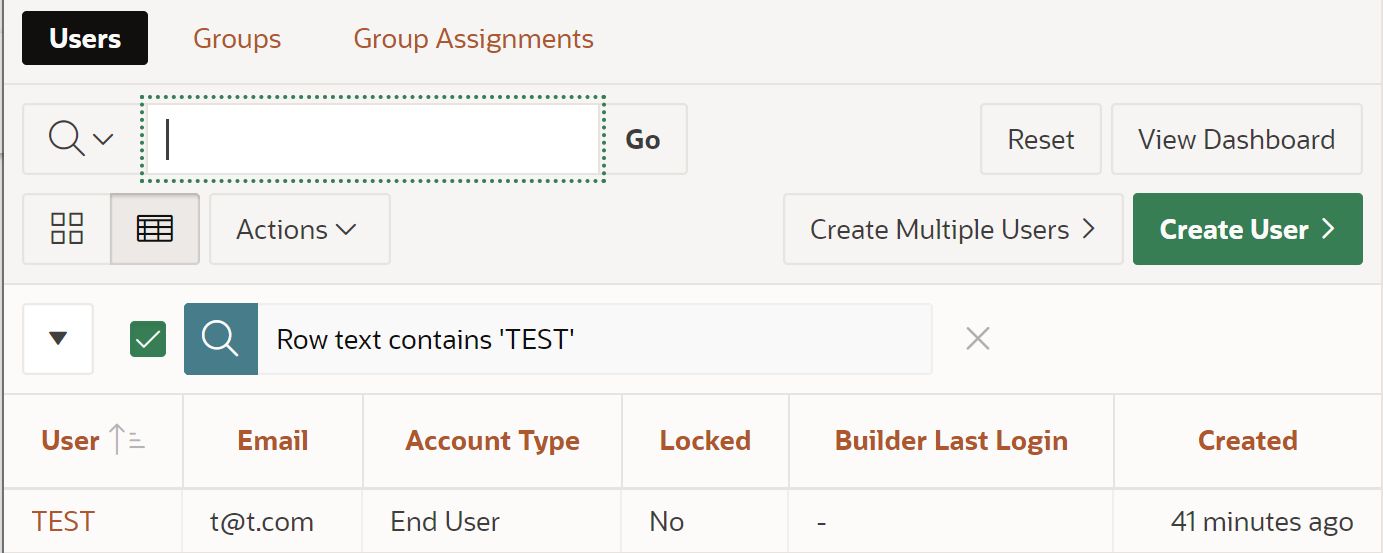
How process would normally work we would log into Application Builder as Admins and create a user in this case let's call it TEST. 

Since we want it to reset its password on first login we will leave Require Change of Password on First Use as default - On.

What happens next is user tries to login and gets familiar screen to us all.

User changes its password and our job is done. Application comes up life continues.........
Well there would not be for this post then would it?

What you may encounter in APEX 20.1 is that you instead get this error
The procedure named null could not be accessed, it may not be declared or the user executing this request may not have been granted execute privilege on the procedure. Check the spelling of the procedure and check that the execute privilege has been granted to the caller
Where is this now coming from? To be honest I was quit caught up with this as I wasn't expecting it. I would call this a bug.

If this setting is turned off things work as expected. Users can normally login but with setting set to ON error comes back.

Digging deeper we did find some Tomcat log errors:
which were not that helpful.

To be fair I was able to reproduce this on 3 out of 5 APEX 20 instances available to me which makes it even more interesting.

Looking at apex.oracle.com seems like it is completely ignoring this flag and it never gives us an option to reset user passwords.

I would bet this functionality worked there before but I can't point to when exactly this ignore flag started to happen to narrow it down to when problems showed up. So in a way we can say it does not happen there but you also can't update your password on first login.

Is there a workaround? Yes but it still leaves a bad taste.

At internal and workspace level there is a setting Account Expiration and Locking which we can disable but this sorts only one part of the problem.
On top of this we need to run additional script - code you can find here.

This is to cater for existing users as newly created users will work perfectly fine even if we create them with Require Change of Password on First Use set to YES.

Great. Small note here setting Account Expiration and Locking to Disable will prevent users of being able to reset their passwords as reset password screen will not be shown anymore. Until this problem is fixed in APEX 20.1 how can we reset user passwords?

One way would be to let user login into the Builder itself which would lead them to the screen where they can reset their passwords. We probably do not want to do this in production environments.


Second way perhaps is to maintain and reset user passwords manually.

There might be a better way of handling the situation so if you happened to have similar issue and solution for it I would love to hear back. Please leave a comment or reach out to me directly.

In conclusion except for hoping these tips will be of help I will encourage you to reconsider your current process and look for alternative credential management solutions.

Please do not use APEX users in production at all. There are plenty of more sophisticated/secure built in authentications available to us in APEX like LDAP, AD etc...... even a custom table would be an option too that is more suitable for production systems. ;)
 
With this said leaving it in your good hands now.


-----------------------------
P.S. Update on 16/07/2020 I love how these things twist and turn on you. :D

I just found out from @dani3lSun that this bug was fixed with patch in the 20.1 PSE (30990551)
which even more contributes to my story that some servers had this error where some did not.

Then I went in and I checked if this patch was already installed on the server and it was but issue is still there. How!!!? I had a feeling we had it installed already but it does not hurt to double check.

Looks like workaround might still hold its in place. Thanks Daniel 

P.S. please check comments bellow. With latest PSE applied - ORA error goes away but we still do not get reset password screen when this flag is on.


Happy APEXing,
Lino